


Search for brands or deals...
Find DealsCategoriesHow to UseBlogContact

Free for Chrome, Firefox & Edge

AussieDiscount browser extension

Verified Australian discount codes, waiting on the store you're already shopping at. Copy a code, paste it at checkout, and tell the next shopper whether it worked.

  • Free, no account
  • Works on 100+ Australian stores
  • Never reads what you type
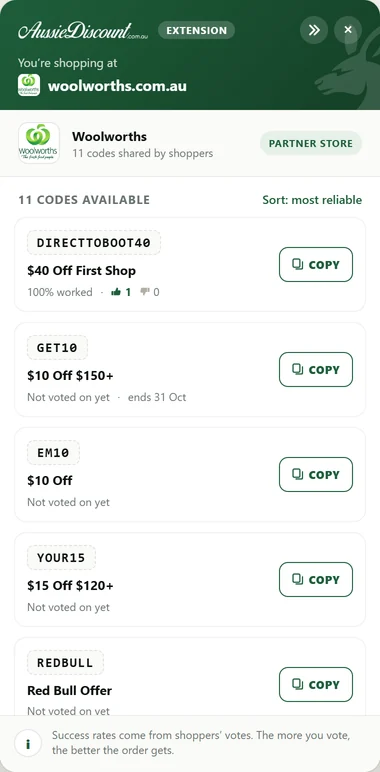
The AussieDiscount panel open on Woolworths, listing codes ranked by how often they worked

How it works

Four steps, all on the store's own page

No new tabs, no searching our site mid-checkout. The codes come to you.

  1. Shop as usual

    Visit a store we cover and a small green AussieDiscount tab appears on the edge of the page, showing how many codes are ready. On every other site the extension doesn't run at all.

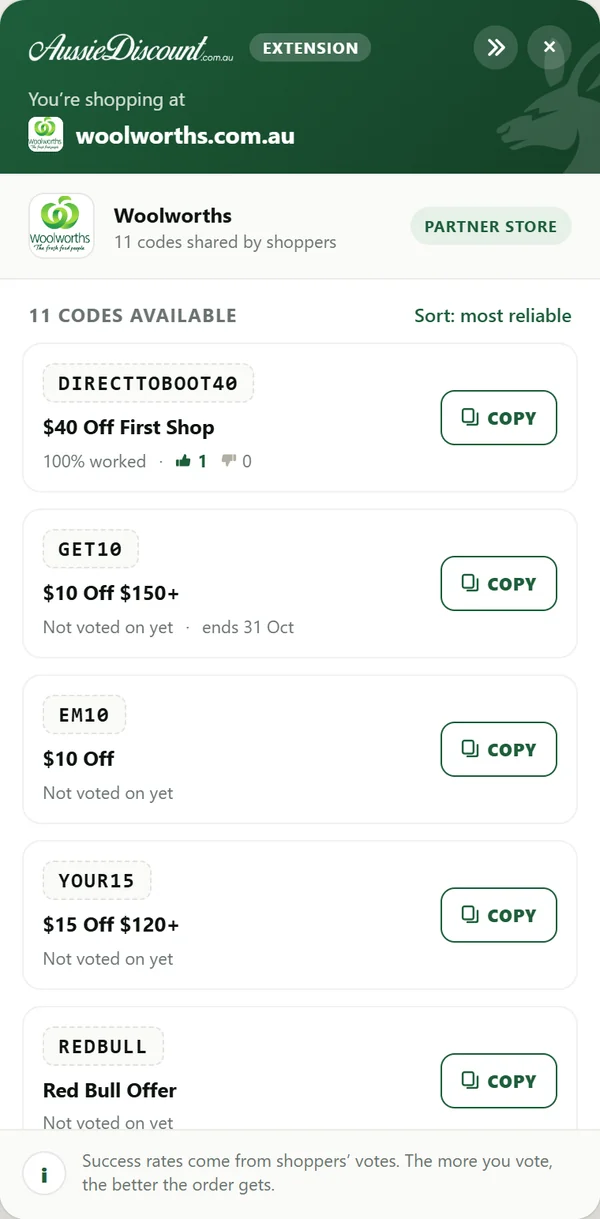
  2. The AussieDiscount panel on Woolworths, listing codes with a Copy button and how often each has worked

    Open the panel

    Click the tab to see that store's codes, ranked by how often they've worked for other shoppers. The list is fetched fresh every time you open it.

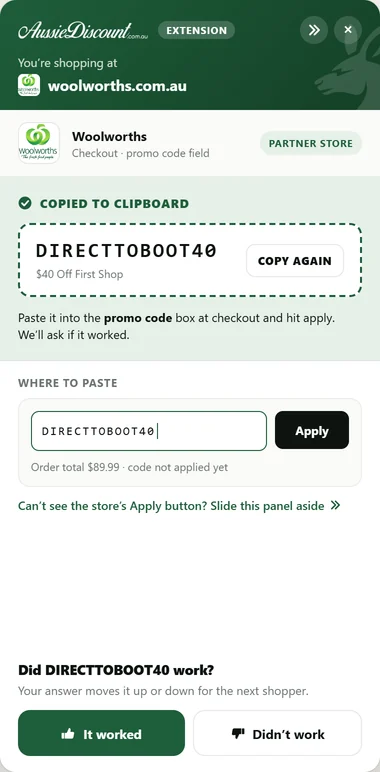
  3. The panel after copying DIRECTTOBOOT40, showing where to paste it and asking whether it worked

    Copy, then paste it yourself

    Hit Copy and the panel shows you where the promo code box is. You paste the code and press apply. The extension never types into the page or touches your cart.

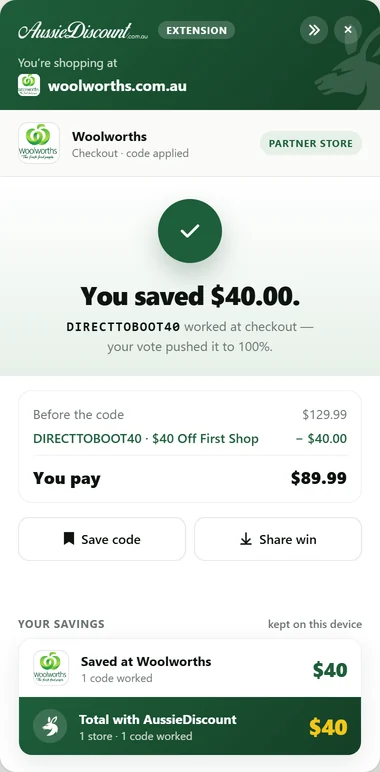
  4. The panel confirming the shopper saved $40.00 at Woolworths, with savings kept on the device

    Say whether it worked

    One tap tells us if the code worked, which moves it up or down for the next shopper. When the checkout shows a discount, the panel tells you what you saved, and that total stays on your device.

Your data

What we collect, in plain words

The extension was built to know as little as possible. Here is everything it sends us, and what it keeps to itself.

Sent to AussieDiscount

The list of stores we cover
Downloaded once a day, about 10 KB. It's the same file for everyone, and your browser checks pages against it locally.
One store's codes
Requested only when you open the panel, so we learn which store's codes were asked for, never the page you were on.
Your vote
Whether a code worked, stored with your IP address and browser type. That's what stops one person voting the same code up again and again.


Never leaves your browser

  • Pages on sites we don't cover. The extension isn't allowed to run there at all.
  • Anything you type, including card details and the promo code box. It never reads or fills in a field.
  • Your savings. The checkout's own discount line is read on your device to show what you saved, and stays there.
  • Codes you've saved, stores you've seen and simple usage counts.
  • An account or profile. There isn't one to create.

Uninstalling removes everything the extension stored. To have your vote records removed, email privacy@aussiediscount.com.au. The full details are in our Privacy Policy.

Always growing

How new stores get added

We add Australian stores to AussieDiscount all the time. This is how each one makes its way into the extension.

  1. We add the store to the site
    We research the brand's own website, check its codes and publish a store page. It's on AussieDiscount straight away.

  2. It goes into the next extension update

    Browsers only let an extension run on the sites it lists up front. That's what keeps it off everything else, so each new store ships in an update.

  3. Chrome, Firefox and Edge review it

    Every update is checked by each browser's own store team before it reaches you.

  4. Your browser updates it for you

    Updates install automatically. Because an update adds new sites, your browser may ask you once to approve them.

New codes don't wait for an update. For stores the extension already covers, codes are fetched live each time you open the panel.

Where it works

Works on 100+ Australian stores

From fashion to groceries, pet supplies to tech. Tap a store to see its codes on our site.

Get it free

Pick your browser

  • Google Chrome

    Also installs in Brave, Opera and other Chromium browsers.

    Add to Chrome
  • Mozilla Firefox

    Listed on Firefox Add-ons, reviewed by Mozilla.

    Add to Firefox
  • Microsoft Edge

    Listed on Edge Add-ons, reviewed by Microsoft.

    Add to Edge

Questions

Extension FAQ

Is the extension free?

Yes. There's no subscription, no premium tier and no account to create.

Why don't I see the AussieDiscount tab on a site?

It only appears on the stores listed on this page. For stores that run separate country sites, it appears on the Australian one only. If a store was added to AussieDiscount recently, it arrives with the next extension update.

Can it see my card details or what I type?

No. It never reads or fills in any field on the page, including payment fields and the promo code box. You paste the code yourself.

Will it slow my browser down?

No. It doesn't run at all on sites we don't cover, and on the ones we do it checks a small list already saved on your device before showing its tab.

Which browsers does it work in?

Chrome, Firefox and Microsoft Edge on desktop. Brave and Opera can install it from the Chrome Web Store. In Opera, choose "Allow extensions from other stores" when it asks.

How do I remove it?

Right-click the AussieDiscount icon in your browser's toolbar and choose Remove. Everything the extension stored on your device is removed with it.

Can I suggest a store or share a code?

Yes. Use “Submit a code” in the panel, or our Submit a Coupon page. Store suggestions are welcome through our contact page.